

Processor Affinity Manager 1.0
A tool to manage default processor affinities in Windows
Program info
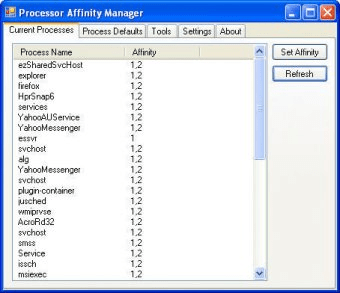
A tool to manage default processor affinities in Windows, and to change processor affinity on the fly for any running process.
This program requires .NET Framework 2.0 in order to work properly.
Processor affinity is a modification of the native central queue scheduling algorithm in a symmetric multiprocessing operating system. Each task (be it process or thread) in the queue has a tag indicating its preferred / kin processor. At allocation time, each task is allocated to its kin processor in preference to others.
Details
Extensions

No information available
The data will be available later.Old versions

No information available
The data will be available later.Awards

Related software

Gathers information on some of the main devices of your system.

Monitor processes, services, and startup programs and remove malware.

It is an alternative to the Windows process manager with much more possibilites.
Related stories
See all
In case you did not know, Microsoft does have a system cleaner of its own, and its latest version is good enough to rival CCleaner and other leaders of this domain.

A seemingly minor improvement to Google Keep may be the first step of a grand plan.
So what are all those lines in the Task Manager? Learn about the essential processes like svchost.exe, winlogon.exe, and other mysterious items.


Comments